





Free Download Freeter full version offline installer. This program helps you organize all your work tools and files in one customizable workspace.
Freeter Overview
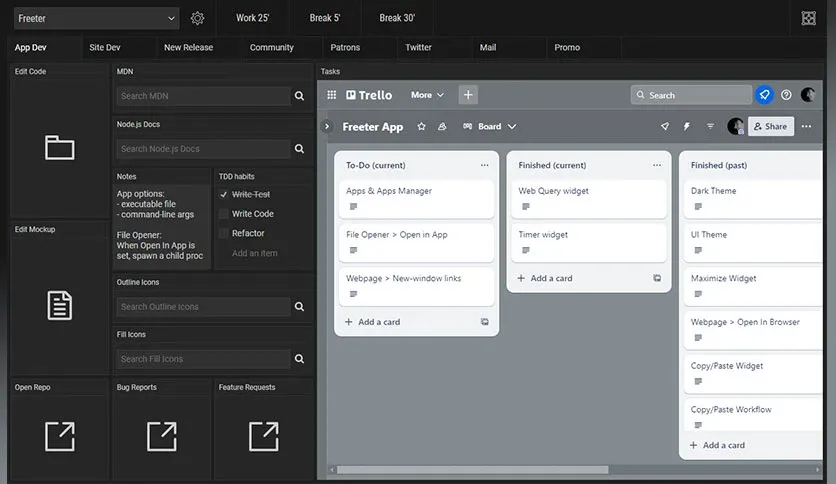
Freeter is a productivity dashboard designed for freelancers, developers, and multi-taskers who juggle scattered tools across browser tabs, apps, and folders. Instead of hunting through windows, you build project-specific boards that embed websites, local files, commands, and snippets in resizable panels. Each project gets its own workspace, so switching clients or tasks means clicking a tab instead of reconstructing your setup from scratch.
The interface uses a drag-and-drop grid where you add widgets for web apps, local documents, shell commands, or plain text notes. Widgets refresh independently, so your CRM dashboard updates in one panel while your Git repo sits open in another. This keeps context locked in place rather than forcing you to alt-tab through twenty windows every morning.
Freeter runs entirely offline once installed. No cloud sync or mandatory accounts—your workspace configs live as local JSON files you can back up or version-control. For teams that work across clients or developers who context-switch between projects, this centralized launcher replaces bookmarks, desktop shortcuts, and sticky notes with a single organized view.
Key Features
- Project-based workspaces with tabs for different clients, codebases, or task contexts
- Embeddable widgets for web pages, local files, folders, shell commands, and text snippets
- Resizable grid layout with drag-and-drop positioning and panel snapping
- Command palette for fast navigation between projects and widgets using keyboard shortcuts
- Template system to clone workspace layouts for recurring project structures
- Auto-refresh intervals for web widgets, useful for monitoring dashboards or live docs
- Dark and light themes with custom accent colors
- Portable workspace exports as JSON files for backup or sharing with teammates
System Requirements and Technical Details
- Operating System: Windows 10 or later, macOS 10.13 or later, Linux with GTK 3
- Processor: Intel Core i3 or equivalent
- RAM: 2 GB
- Disk Space: 150 MB for installation
- Display: 1280×720 minimum resolution
- Internet: Required only for web widgets and initial download
Installation and First Launch
Download the installer from the button on this page. Run the setup file and accept the default installation path unless you manage portable installs on external drives. The installer places desktop and Start menu shortcuts automatically. Click Finish to launch immediately or open it later from the shortcut.
On first launch, Freeter shows an empty workspace with a welcome prompt. Click the plus icon in the top toolbar to create your first project tab. Name it after a client or codebase, then add widgets by clicking the grid icon and selecting Web Page, File, or Command from the dropdown. Drag the new widget to position it, resize by pulling the bottom-right corner, and configure the source URL or file path in the widget's settings panel on the right.
The most common adjustment is setting refresh intervals for web widgets. Right-click any web panel, choose Settings, and enable Auto-Refresh with a custom interval in seconds. This keeps live dashboards or documentation current without manual reloads. Save your workspace using Ctrl+S or Cmd+S to persist changes between sessions.
Mencari link download asli… menunggu 0 detik. Mohon tunggu, biasanya beberapa puluh detik.





