





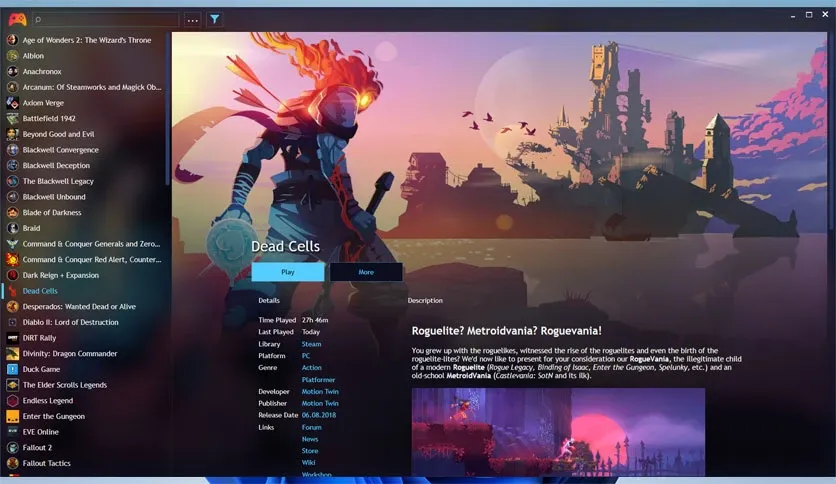
Free Download Playnite full version offline installer. This program helps you unify all PC games and console libraries into single customizable interface.
Playnite Download Latest Version Overview
Playnite is open source library manager created for PC gamers managing multiple digital storefronts. Software centralizes titles from Steam, Epic Games Store, GOG, Origin, Ubisoft Connect, and Xbox app into unified dashboard. Users connect individual platform accounts to automatically import entire game catalogs without manual entry.Application targets users frustrated by scattered launchers consuming system resources simultaneously. Lightweight design ensures minimal footprint while fetching metadata, cover art, and playtime statistics. Desktop mode provides classic application interface, while fullscreen mode transforms software into custom couch gaming experience comparable to console dashboards.Primary strengths include high extensibility through third-party extensions and themes. Users customize layout, filter titles by genre, platform, or installation status, and launch games directly from single interface. Emulators also integrate seamlessly, allowing retro titles to sit alongside modern releases.Key Features of Playnite
- Unified library management combining Steam, Epic Games, GOG, and other major PC storefronts in one application.
- Fullscreen mode designed for gamepad navigation, providing custom TV interface for living room setups.
- Extensive metadata downloading for box art, backgrounds, descriptions, and release dates automatically.
- Playtime tracking monitoring total hours spent across all connected platforms and standalone games.
- Emulation support integrating retro consoles and arcade systems with automated ROM importing.
- Powerful filtering, sorting, and categorization tools for large game collections.
- Open source architecture enabling community-created themes, extensions, and plugins.
- Safe handling of user credentials via official API logins without storing plain text passwords.
System Requirements and Technical Details
- Operating System: Windows 10, Windows 11 (64-bit required)
- Processor: Intel Core 2 Duo or AMD Athlon 64 processor (1.5 GHz or faster)
- RAM: 2 GB RAM minimum
- Hard Disk Space: 500 MB free storage for application and metadata cache
- Display: 1280x720 screen resolution or higher
- Internet Connection: Broadband internet required for account synchronization, metadata downloads, and updates
Installation and Setup Guide
Obtain setup file using download button located on this page. Run installer executable and follow on-screen prompts, accepting default settings for standard installation.Launch application after installation completes. Welcome wizard prompts connection of game accounts and import of installed games. Select desired platforms and sign in securely through official authentication windows.Open settings menu after initial library sync finishes. Navigate to Metadata settings to configure automatic art downloads and update intervals according to storage preferences.Mencari link download asli… menunggu 0 detik. Mohon tunggu, biasanya beberapa puluh detik.





