





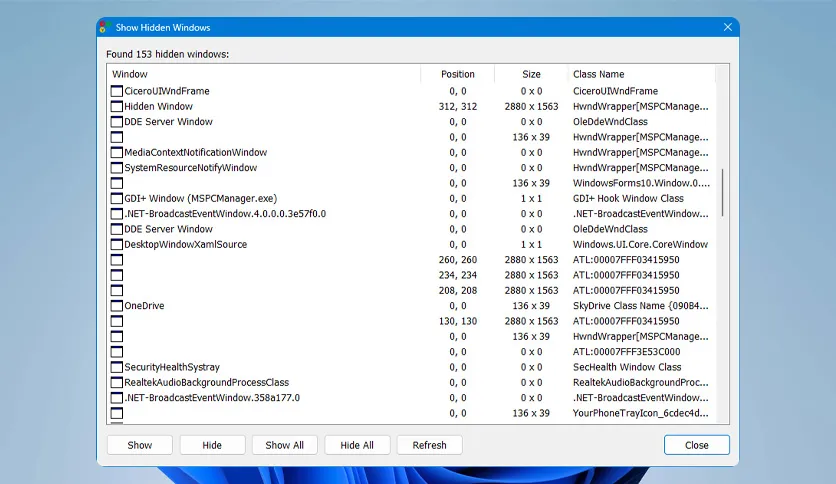
Free Download Show Hidden Windows full version offline installer. This program helps you locate and restore invisible, off-screen, or minimized windows that vanish from the standard Windows taskbar.
Show Hidden Windows Download Latest Version
Show Hidden Windows is a lightweight utility designed for Windows operating systems to manage stubborn application windows that refuse to display normally. Many background processes, crashed applications, or multi-monitor configurations leave windows stranded outside the visible desktop boundary. Standard methods like Alt+Tab or taskbar hovering often fail to bring these rogue elements back into focus. This software scans the entire active window hierarchy across the system to reveal every single handle currently running.
Power users, system administrators, and multi-monitor desktop workers benefit most from this utility. When applications crash silently or spawn child windows off-screen after a display disconnect, finding them manually wastes valuable time. Show Hidden Windows bypasses standard interface limitations by querying the OS window manager directly. It presents a centralized list of all active, hidden, minimized, and background windows currently loaded into memory.
The primary strength of the tool lies in its speed and minimalism. It requires no complex configuration, background service monitoring, or resource-heavy dependencies. Users launch the executable, inspect the populated window list, and apply actions instantly. By integrating tightly with native Win32 API functions, the software guarantees high compatibility across various Windows desktop environments without introducing system instability.
Core Features and Capabilities
- Detects completely hidden windows that lack taskbar entries or system tray icons.
- Recovers off-screen windows stranded outside current monitor boundaries after display configuration changes.
- Forces closed or unresponsive minimized applications to restore onto the primary display grid.
- Displays detailed window properties including handle IDs, process names, parent relationships, and exact coordinate locations.
- Allows users to terminate rogue background processes directly from the enumerated window list.
- Brings specific windows to the foreground instantly with a single mouse click or keyboard shortcut.
- Features a portable architecture that runs without requiring permanent system registry modifications.
System Requirements and Technical Details
- Operating System: Windows 7, Windows 8, Windows 10, Windows 11 (32-bit and 64-bit editions).
- Processor: 1 GHz or faster x86-compatible processor.
- RAM: 512 MB minimum system memory.
- Hard Disk Space: 20 MB available storage for installation and temporary files.
- Display: 1024x768 screen resolution or higher.
- Internet: Active internet connection required only for initial software acquisition.
Installation and Usage Guide
Click the download link on this page to acquire the official Show Hidden Windows setup package. Extract the downloaded archive if compressed, then double-click the installer executable to begin the setup wizard. Accept the default installation paths and prompt confirmations to complete the file deployment onto your local drive.
Launch the application with administrator privileges if certain system processes or elevated background windows fail to appear in the scan list. Right-click the program executable and select Run as administrator to bypass User Account Control permission blocks. If a target window remains unresponsive after clicking restore, terminate the parent process via the built-in process manager and relaunch the application.
To replicate this setup on another machine, transfer the installer file via USB storage or download it directly on the target system. Run through the same installation sequence and apply identical privilege configurations to ensure consistent window recovery performance across all workstations.
Mencari link download asli… menunggu 0 detik. Mohon tunggu, biasanya beberapa puluh detik.





